You may have heard this term but are not entirely sure what it means?
The technique of storing cached data or cached files as part of your browsing history on a phone or web browser is to improve the user experience on future visits to a website. When you visit a website or open an app for the first time, it takes a bit longer to load than it would if you were visiting it for a second time or any time after that. The reason for this is the cached data.
Regardless of the type of app or device (laptops, tablets, smartphones) used to consume content or exchange information, they all contain space on their drives to store cached data for quick access.
An ideal example would be Facebook. Cache memory saves the states for the user. If you browse through your Facebook feed, close Facebook and then open it again after 15 minutes, you’ll be able to scroll down and see posts that were previously loaded. Without cache, everything would need to reload.
The same goes for a website, the first time you load the site it takes time to load all of the information for you to view it. Now that you have visited the site your cached files will accelerate the load next time.
Normally, if the browser loads a website and detects a change, it will fetch a new version of the site from the remote web server and replace the cache. But the process is not perfect, and sometimes your browser may end up with a local copy of the website data in your browser cache that doesn’t match the latest version on the server. As a result, a web page may look incorrect or not function properly.
The technique of storing cached data or cached files as part of your browsing history on a phone or web browser is to improve the user experience on future visits to a website. When you visit a website or open an app for the first time, it takes a bit longer to load than it would if you were visiting it for a second time or any time after that. The reason for this is the cached data.
Regardless of the type of app or device (laptops, tablets, smartphones) used to consume content or exchange information, they all contain space on their drives to store cached data for quick access.
An ideal example would be Facebook. Cache memory saves the states for the user. If you browse through your Facebook feed, close Facebook and then open it again after 15 minutes, you’ll be able to scroll down and see posts that were previously loaded. Without cache, everything would need to reload.
The same goes for a website, the first time you load the site it takes time to load all of the information for you to view it. Now that you have visited the site your cached files will accelerate the load next time.
Normally, if the browser loads a website and detects a change, it will fetch a new version of the site from the remote web server and replace the cache. But the process is not perfect, and sometimes your browser may end up with a local copy of the website data in your browser cache that doesn’t match the latest version on the server. As a result, a web page may look incorrect or not function properly.
When updating websites through your CMS (Content Management System) or if you have an agency like us to do it for you, sometimes the cached version can ‘get in the way’ when checking that the updates are live. Clearing the cache can sort these problems by making the site pull the latest updates from the server and not the cached version.
You can opt to go through the long-winded settings as below for example… BUT BE CAREFUL, this will delete ALL your cached files, not just for the website you are on:
Follow these instructions to clear Google cache on a computer.
Follow these instructions to clear your Safari cache on a computer.
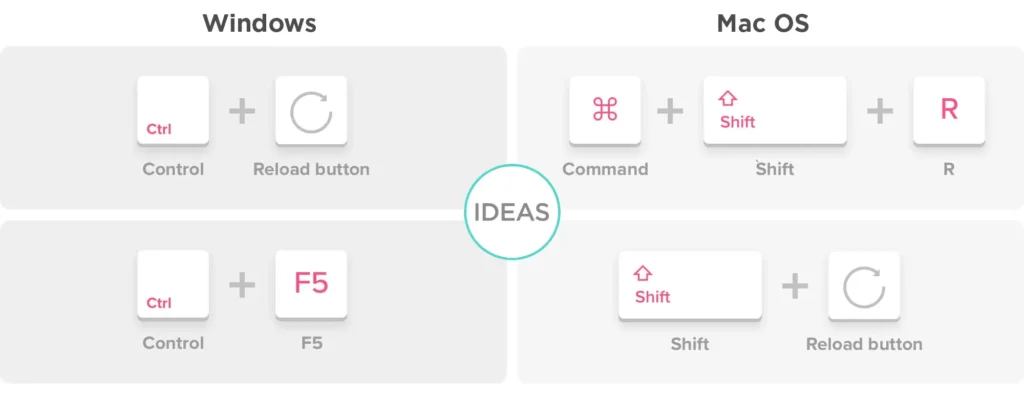
If you want to skip the long-winded way – here’s a selection of our favoured keyboard shortcut tips for you.
In most browsers on PC and Mac, you can perform a simple action to force a hard refresh. Hold down the Shift or CTRL key on your keyboard and click on the reload icon on your browser’s toolbar or right click on the mouse and select ‘reload’. However, this isn’t always reliable and you may need to repeat it several times for it to fully work.
If you want to guarantee to see the latest set of files you can, on any device, open a browser in Incognito mode and view the site.
After you perform the hard refresh, you should see the web page go blank, and the reloading process will take longer than usual – a bit like it’s the first ever time you have loaded the page. That’s because the browser is redownloading all of the data and images on the site ie. the latest from the server.
Looking for an agency partner to help drive your business forward?